
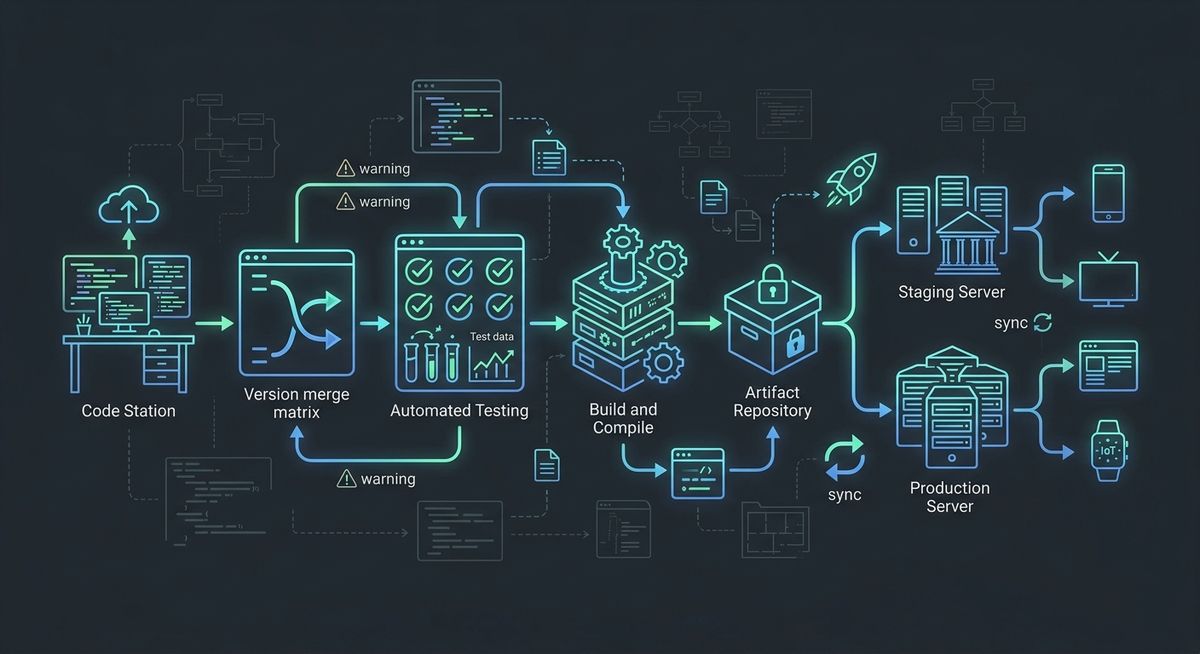
In software development, having code run on your local machine (localhost) is only the first milestone. Shipping code safely, quickly, and reliably to Production is one of the most critical stages of modern software engineering. Manual FTP transfers, hand-crafted server builds, and direct server edits are heavily prone to human error.
CI/CD (Continuous Integration / Continuous Delivery & Deployment) automates the entire journey from code commits to production deployments, significantly boosting release velocity and stability.
1. What Are CI and CD?
A modern pipeline consists of two primary concepts:
- CI (Continuous Integration): Developers frequently merge their code changes into the main branch. Every merge triggers automated builds and tests to catch bugs early.
- CD (Continuous Delivery): Tested code is automatically prepared and staged for deployment to staging or production (may require manual approval).
- CD (Continuous Deployment): Every change that passes all pipeline stages is automatically released to production without manual intervention.
2. Stages of a Typical CI/CD Pipeline
A robust CI/CD pipeline is structured into distinct steps:
| Stage | Action | Purpose |
|---|---|---|
| 1. Lint & Format | Code style and static analysis check | Ensure code quality and team consistency. |
| 2. Build | Install dependencies & compile application | Verify the code compiles without errors. |
| 3. Test Execution | Run Unit, Integration, and E2E tests | Prevent regressions before reaching live servers. |
| 4. Package | Build Docker image & upload to registry | Produce an isolated, executable artifact. |
| 5. Deploy | Update target servers or Kubernetes clusters | Deliver the new features to end-users. |
3. Sample GitHub Actions Workflow Configuration
Here is an example .github/workflows/ci-cd.yml configuration for a Node.js / TypeScript application:
##yaml name: Node.js CI/CD Pipeline
on: push: branches: [ "main" ] pull_request: branches: [ "main" ]
jobs: build-and-test: runs-on: ubuntu-latest
steps:
- name: Checkout Repository
  uses: actions/checkout@v4

- name: Setup Node.js Environment
  uses: actions/setup-node@v4
  with:
    node-version: '20'
    cache: 'npm'

- name: Install Dependencies
  run: npm ci

- name: Run Linter
  run: npm run lint

- name: Execute Automated Tests
  run: npm test

- name: Build Project
  run: npm run build
- CI/CD Best Practices Fail Fast: Place fast-executing checks (like Linters and Unit Tests) at the beginning of your pipeline to avoid wasting execution time on broken code.
Secure Secret Management: Never hardcode API keys, passwords, or SSH keys in source control. Use your CI/CD provider's secret storage (e.g., GitHub Secrets).
Environment Isolation: Keep Test, Staging, and Production environments completely separated.
Conclusion
Building an automated CI/CD pipeline requires an upfront time investment, but pays off immediately with developer confidence, rapid feedback loops, and near-zero deployment errors. Remember: Any step that isn't automated is a future human error waiting to happen.